Headr

Software for window and door companies, built inside one.

Headr started at a window and door company, so it follows how those jobs really go. The deposit comes first, then the final measure, then an office check before anything is ordered, because a wrong size is a lost month. Units are received and checked at the warehouse, staged on a pick ticket, then installed.

From $29 a month. Standard is $129 for up to 25 people with a login.

How a window and door job runs in Headr

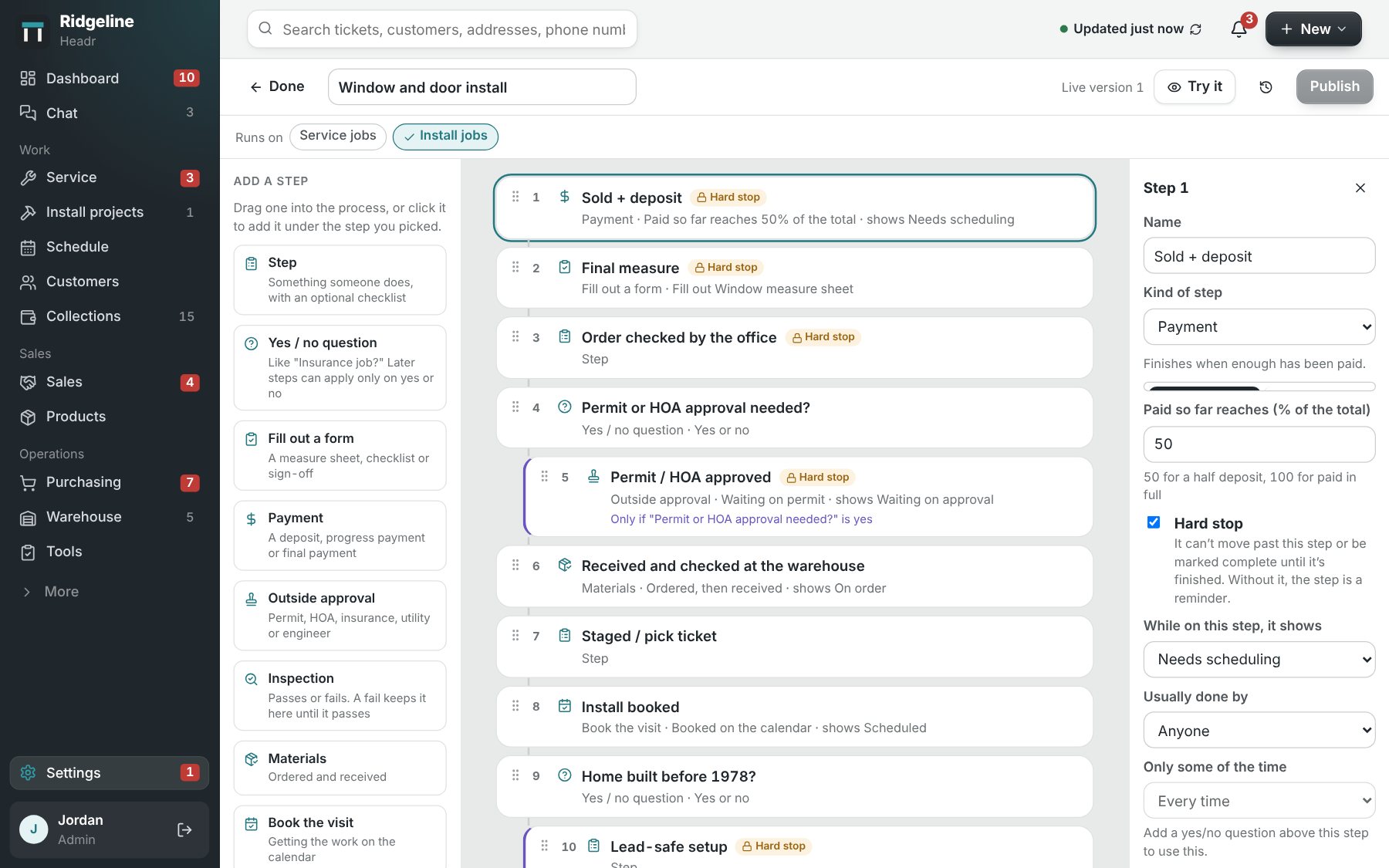
These are the steps Headr sets up when you pick windows and doors at sign-up. Steps marked have to be finished before the job moves on. Steps that only apply sometimes show up when you answer a yes or no question.

Want it shorter? The simple version is 6 steps: Sold + deposit, Final measure, Ordered and received, Install booked, Installed, Final payment. Rename, reorder or add steps any time.

Window and door install

Final measure gate, order check, warehouse receiving, lead-safe, walkthrough, warranty.

  1. Sold + depositHas to be finished firstPayment
  2. Final measureHas to be finished firstForm
  3. Order checked by the officeHas to be finished first
  4. Permit or HOA approval needed?Yes or no question
  5. Permit / HOA approvedHas to be finished firstOnly if “Permit or HOA approval needed?” is yesApproval
  6. Received and checked at the warehouseParts
  7. Staged / pick ticket
  8. Install bookedBooked visit
  9. Home built before 1978?Yes or no question
  10. Lead-safe setupHas to be finished firstOnly if “Home built before 1978?” is yes
  11. Installed
  12. Walkthrough and sign-offForm
  13. Final paymentHas to be finished firstPayment
  14. Warranty registered
  15. Follow-up call and review request
Service call: 17 steps

Dispatch, diagnose, options, approval, repair or return visit, invoice, follow-up.

  1. Call in
  2. ScheduledBooked visit
  3. Confirmation sent
  4. On the way
  5. Arrived
  6. Diagnosis
  7. Options presented
  8. Customer approved the repair?Yes or no question
  9. Replacement estimate to salesOnly if “Customer approved the repair?” is no
  10. Parts needed for a return visit?Only if “Customer approved the repair?” is yesYes or no question
  11. Parts inOnly if “Parts needed for a return visit?” is yesParts
  12. Return visit bookedOnly if “Parts needed for a return visit?” is yesBooked visit
  13. Repair doneOnly if “Customer approved the repair?” is yes
  14. Tested and workingOnly if “Customer approved the repair?” is yes
  15. Invoice paidHas to be finished firstPayment
  16. Maintenance plan offered
  17. Review request sent

What window and door contractors get

No order goes out unchecked

Final measure and "Order checked by the office" both have to be finished before the job moves on.

The warehouse knows what’s coming

When the last unit for a job is received and checked, the office sees it’s ready to schedule.

Service calls after the install

Adjustments, warranty work and repairs run as service calls with their own steps and their own schedule color.

Plus everything else in Headr

One calendar for installs, service and sales. A sales pipeline with estimates. Warehouse stock and parts for each job. Your own forms, automations, team chat and texts to customers. It’s all included in Standard and Pro.
See all of Headr

The Headr process editor, where you arrange the steps a job goes through.

Questions from window and door contractors

Does Headr work for replacement window companies?

Yes. It was built for replacement window, door and siding work, from the sales visit to the warranty registration.

Can my installers see their jobs on a phone?

Yes. Installers see their own schedule and the jobs on it, and simple mode hides the menus they don’t use.

Can I build my own measure sheet?

Yes. Make your own forms, like a measure sheet or an install sign-off, and they print with your logo.

How much does Headr cost?

Lite is $29 a month for up to 3 logins, with your trade’s ready-made steps and forms. Standard is $129 a month for up to 25 logins and includes everything. Pro is $179 a month for up to 50 logins, with 1 TB of storage, more AI help and faster support. Crew members you only put on the schedule are free on every plan.

Is there a free trial?

Yes. Try it free for 14 days with your own jobs and crew.

Try it on your next window and door job.

Try it free for 14 days